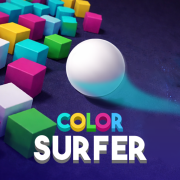








Color Surfer thumbnail

Color Surfer

Color Surfer
  • 🖱️Hold and drag the mouse to steer the ball left and right (touch: drag on screen).
  • The ball rolls forward automatically—your input is lateral movement only.
  • 🎨Bump objects that match your ball’s color; they clear your path toward the goal.
  • Any contact with a non-matching color ends the run—treat wrong hues as instant hazards.
  • 🏁Aim to reach the finish line on each 3D track without illegal collisions.
  • Read several obstacles ahead so you never steer into a forbidden color at the last frame.
  • Use same-colored blocks as cover to slip past sections dense with other hues.
  • On tight mazes, favor small smooth drags over sharp turns that clip edges.
  • Later levels punish rushing—learn the layout first, then push pace once it feels familiar.
  • Instant restarts are your friend: short, focused retries build pattern memory fast.

Color Surfer

Steer an auto-rolling ball through 3D tracks—collide with matching colors only, dodge every other hue, and reach the finish.

4.4

512 votes

118,000

Total plays

AZGames

2026

HTML5

Browser (Desktop) • Browser (Mobile) • Browser (Tablet)

HTML5

Casual GamesKids GamesArcade GamesSkill Games

About Color Surfer

Color Surfer is a 3D casual runner-style game built around a simple rule: your rolling ball may touch obstacles only when they share its current color. The course scrolls forward in bright, saturated lanes where blocks and barriers appear in competing hues—brush the wrong shade and the attempt stops on the spot, so steering and anticipation matter as much as raw speed. Later layouts tighten corridors and mix colors more aggressively, rewarding players who read the lane instead of yanking the ball through every gap.

Color Surfer keeps the rule set brutally clear—matching collisions good, everything else bad—so each fail teaches readable lessons about lane discipline. Bright 3D presentation keeps obstacles legible at speed, while escalating stages fold in narrower paths and busier palettes that reward players who plan drags instead of panicking. If you enjoy one-thumb casual challenges on Wacky Flip, compare its color discipline with Tap Drift’s corner timing or Curve Rush’s line reading. Launch in-browser whenever you want a vivid reflex workout—no install, just play.

How to Play Game

Guide the ball along each 3D track until you cross the finish line. Forward motion is handled for you; your job is lateral control so the sphere strikes objects that match its color and never scrapes a mismatched one. A single wrong-color contact typically resets the run, so clean lines and fast reads beat reckless speed.

Game Controls & Timing

Mastering the Controls

Hold and drag with the mouse (or an equivalent touch-and-drag gesture on mobile) to shift the ball left and right while it rolls ahead automatically. Small, steady adjustments usually track narrow channels better than wide sweeps, especially when the path bends or stacks obstacles in alternating colors.

Level Progression

Every solid you can legally bump is the same hue as the ball; everything else behaves like a hard fail on contact. Mixed-color arrangements and tighter spacing show up as levels climb, so you often thread between hazards or tuck behind same-colored props to shield yourself from the wrong tone.

Scoring System

Progress is level-based: clearing a stage safely moves you into the next layout rather than an open-ended score chase. The reward loop is mastering trickier mazes, quicker pacing, and cleaner restarts rather than grinding unrelated pickups.

Skill Unlocks

Early courses teach the color contract; advanced ones shrink margins and weave patterns that punish rushing. When corridors get narrow or color blocks interleave, slow down mentally—plan the next lane change before you commit, because one clipped edge on the wrong pigment ends the try.

Controls

  • N/A
  • Drag left: steer the ball toward the left side of the track
  • Drag right: steer the ball toward the right side of the track
  • Hold and drag: continuous lateral control while the ball rolls forward
  • P: Pause game
  • R: Restart run

Conclusion

Flip Master 2 is an exciting and addictive trampoline simulation game that combines realistic physics with intuitive controls. Whether you're a casual gamer looking for quick entertainment or a competitive player aiming for high scores, this game offers something for everyone.

The game's responsive controls, multiple environments, and realistic physics create an immersive experience that will keep you engaged for hours. With unlockable skills and power-ups, Flip Master 2 continues to evolve and provide fresh challenges for players of all skill levels.

flip master 2flip master 2 gametrampoline gamestunt gameflip gamephysics gameonline gamesfree games
W

Play Wacky Flip free online! Master the art of backflips in this skill-based simulator game. No download required—play instantly in your browser. Experience realistic ragdoll physics and unlock new skills across 8 challenging levels.

© 2025 Wacky Flip Game. All rights reserved.